mscrm-addons.com logomscrm-addons.com logo
  • Release History
  • Knowledge Base
  • Documentation
  • Contact Support
  • Release History
  • Knowledge Base
  • Documentation
  • Contact Support
home/Knowledge Base/TelephoneIntegration (TI)/TelephoneIntegration Server – do not use Integrated Security

TelephoneIntegration Server – do not use Integrated Security

148 views 0 Updated on July 27, 2022

It is not recommended to use Integrated Security for Telephone Integration.

How to change:

  1. Uncheck ‘Use default Credentials’ in the groupbox ‘Authenticated as:’ (see Figure 1)
  2. Enter User, Domain and Passwort (user should have access to CRM)
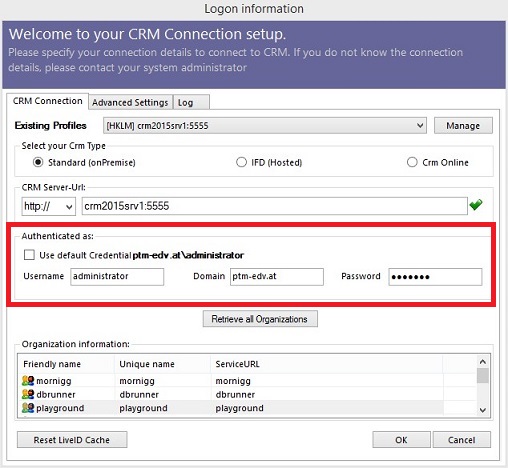
Figure 1: Connection setup dialog


That’s it! We appreciate your feedback! Please share your thoughts on our blog and products
by sending an email to support@mscrm-addons.com!

reworkneeded … Delete from Dyn365.

Was this helpful?

Yes  No
Related Articles
  • How to activate per User Licensing in CRM 2011
  • How to access mscrm-addons product settings in Dynamics 365
  • Microsoft Entra ID licensing counts explained
  • “Server2Server” authentication for the DocumentsCorePack Template Designer and Telephone Integration
  • How licenses are counted
  • Telephone Integration Client Unattended Setup
Latest Articles
  • Why do document errors and inconsistencies increase as teams scale in Dynamics 365?
  • “Recipients not found” warning when using One-Click-Action
  • What makes a Dynamics 365 add-on easy for partners to recommend in every deal 
  • What actually counts toward Dataverse storage costs (and what doesn’t)?
  • Enhancing data security for DCP and AE using a virtual network
Popular Articles
  • DocumentsCorePack Template Designer – Getting Started
  • Step-by-Step: How to configure a One-Click-Action
  • Application Access for Dynamics 365
  • How licenses are counted
  • How to find your environment’s unique name in Microsoft Dynamics 365
Top Rated Articles
  • “Undefined”-labels in Chrome and Edge 114 and higher
  • How to insert Condition Fields in DocumentsCorePack Templates designer
  • Important information for Dynamics 365 online customers using DocumentsCorePack and/or AttachmentExtractor
  • How to activate the DocumentsCorePack Connector for PowerApps & Microsoft Flow
  • How licenses are counted
Categories
  • *News and General Infos* 71
  • Webinars 47
  • Template Designer(DCP 197
  • DocumentsCorePack(DCP 268
  • TelephoneIntegration (TI 65
  • AttachmentExtractor (AE 78
  • PowerSearch (PS 50
  • ActivityTools (AT 61
  • SmartBar (SB 54
  • GroupCalendar (GC 47
Our Vision

“We see it as our purpose to provide products that simplify and speed up our customers’ Microsoft Dynamics 365 experience.”

Knowledgebase
LogIn
mscrm-addons.com
  • Products
  • Online Shop
  • Downloads
  • My Account
About Us
  • About Us
  • Case Studies
  • Newsletter
  • Partner Program
  • Contact
Support
  • Support
  • Terms & Conditions
  • Documentation
  • Webinars
  • Legal Documents
  • Impressum
  • © 2025 www.mscrm-addons.com. All Rights Reserved.