Dataverse storage costs are driven primarily by attachments, tracked emails, notes, and activity data—not by the number of core CRM records like accounts, contacts, or opportunities.
This distinction matters because many organizations try to control storage by limiting record creation or restricting usage, without realizing that most of the cost sits elsewhere.
Understanding what actually consumes storage is the first step toward reducing it safely.
Why most Dataverse storage costs don’t come from CRM records
Core CRM records are relatively lightweight. Even large Dynamics 365 environments with hundreds of thousands of accounts or contacts typically consume far less storage than expected.
Storage pressure usually comes from the data attached to those records:
- Emails tracked into Dynamics
- Files uploaded to timelines
- Notes used to store documents
- Historical activity retained indefinitely
These files are stored as binary data inside Dataverse tables, which are optimized for relational data—not long-term file storage.
By contrast, the following activities typically do not meaningfully impact Dataverse storage costs:
- Creating standard CRM records
- Adding fields or metadata
- Normal transactional updates
- Workflow execution without attachments
These elements matter for system performance and design—but they are rarely the primary cause of unexpected storage overages.
The Dataverse data that adds up fastest
Certain types of data contribute disproportionately to storage growth:
- Tracked emails with attachments
- Timeline and activity attachments
- Notes used as document repositories
- Historical activity records retained for years
Individually, these items feel insignificant. Collectively, they compound quickly as usage scales across teams and time.
This is why storage growth often feels sudden—even though it has been building quietly for months or years.
Pattern we see repeatedly
Across Dynamics 365 environments, teams often assume storage overages mean “too much CRM data.”
Example:
An IT Manager investigates a storage warning and starts reviewing record counts, only to discover that record volume hasn’t changed significantly. The real growth is coming from years of tracked emails and attachments stored inside activity tables—data that was never actively governed after go-live.
Once this becomes clear, the conversation shifts from “how do we restrict usage?” to “how do we manage file storage properly?”
What happens if this is misunderstood
When organizations misidentify the source of storage growth, they often apply the wrong fixes.
They restrict features users rely on, purchase additional Dataverse capacity repeatedly, or attempt manual cleanup efforts that are risky and time-consuming.
For IT Managers, this creates recurring budget pressure. For Solution Architects, it results in reactive conversations that could have been avoided with better visibility into how storage is actually consumed.
How this insight changes the storage conversation
Once teams understand that file-based data is the real driver, the solution becomes clearer.
Instead of limiting user behavior or deleting records, organizations can focus on where files are stored and how they are retained, while keeping Dynamics 365 as the system of record.
This is the foundation for safe, long-term storage cost control.
How AttachmentExtractor addresses Dataverse storage costs
This is why organizations and partners use AttachmentExtractor.
AttachmentExtractor is a set-it-and-forget-it solution that automatically extracts email attachments and notes from your Dynamics 365 environment and moves them to secure, cost-effective Azure Blob or SharePoint storage—without disrupting users or breaking links. This allows teams to reduce storage costs without deleting data, disabling features, or changing how users work.
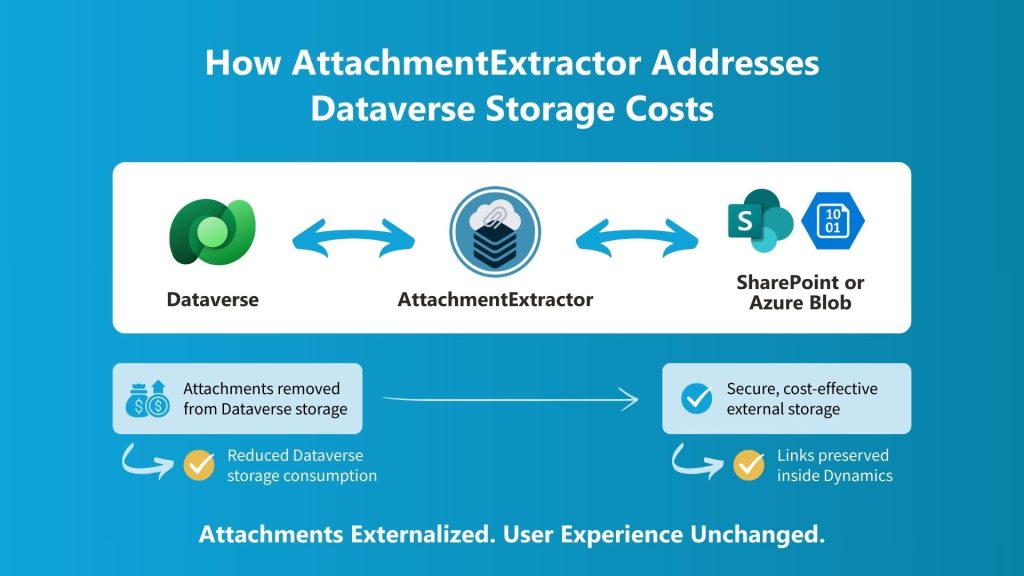
For IT Managers, it provides predictable cost control. For Solution Architects, it offers a low-risk, repeatable approach that works across environments.
Frequently Asked Questions
Dataverse storage growth is driven primarily by file-based data—tracked emails with attachments, timeline files, notes, and historical activity—not by the creation of standard CRM records.
Yes. Attachments on tracked emails are stored as binary data inside Dataverse and accumulate quickly over time.
Yes. Structural approaches focus on moving files out of Dataverse while preserving access and compliance.
Download the Attachment Extractor Guide to see how organizations identify what’s driving Dataverse storage costs—and how they reduce them safely without deleting data.