mscrm-addons.com logomscrm-addons.com logo
  • Release History
  • Knowledge Base
  • Documentation
  • Contact Support
  • Release History
  • Knowledge Base
  • Documentation
  • Contact Support
home/Knowledge Base/DocumentsCorePack(DCP)/Security issues when installing DocumentsCorePack (Defender)

Security issues when installing DocumentsCorePack (Defender)

250 views 0

When installing the DocumentsCorePack Client (Add-In) or Server (on-Premise deployment of the DCP Service), you may encounter an issue where Microsoft Defender SmartScreen will block the executable file. If this occurs, the problem can be circumvented by clicking “More info” and then clicking “Run anyway.” The installation will then proceed as normal.
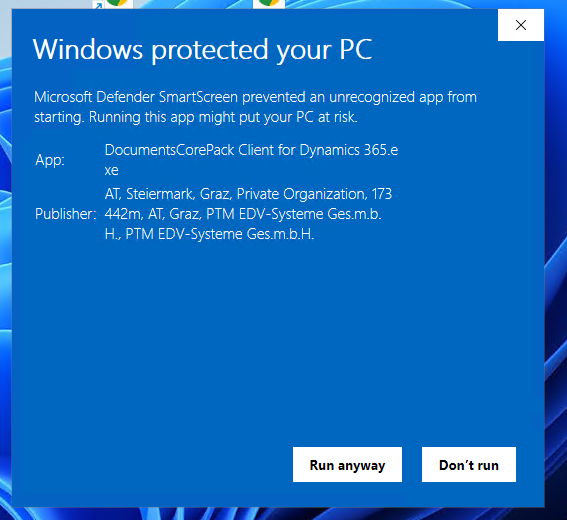
Microsoft Defender SmartScreen blocking the .exe
Figure 1: Microsoft Defender SmartScreen blocking the .exe

In some cases, after downloading the .zip of our installer, the .zip itself may be blocked. This can be resolved by opening the file’s Properties and selecting Unblock.
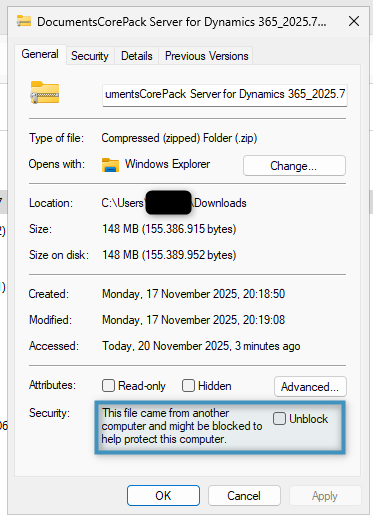
Unblocking the .zip
Figure 2: Unblocking the .zip

​That’s it! We appreciate your feedback! Please share your thoughts by sending an email to support@mscrm-addons.com.

Tags:troubleshootingsupportsmartscreen

Was this helpful?

Yes  No
Related Articles
  • Recap: European BizzApps Summit 2026
  • MFA Emails may be blocked by Spam Filters
  • Why partners standardize on mscrm-addons.com instead of mixing tools
  • How do teams automate document and PDF generation directly inside Dynamics 365?
  • Enable logging for the AutoMergeAzure Plugin for Dynamics 365 Online
  • Why Microsoft partners standardize on a single Dynamics 365 storage solution
Latest Articles
  • Recap: European BizzApps Summit 2026
  • MFA Emails may be blocked by Spam Filters
  • Why partners standardize on mscrm-addons.com instead of mixing tools
  • How do teams automate document and PDF generation directly inside Dynamics 365?
  • Enable logging for the AutoMergeAzure Plugin for Dynamics 365 Online
Popular Articles
  • DocumentsCorePack Template Designer – Getting Started
  • Step-by-Step: How to configure a One-Click-Action
  • Application Access for Dynamics 365
  • How licenses are counted
  • How to find your environment’s unique name in Microsoft Dynamics 365
Top Rated Articles
  • “Undefined”-labels in Chrome and Edge 114 and higher
  • How to insert Condition Fields in DocumentsCorePack Templates designer
  • Important information for Dynamics 365 online customers using DocumentsCorePack and/or AttachmentExtractor
  • How to activate the DocumentsCorePack Connector for PowerApps & Microsoft Flow
  • How licenses are counted
Categories
  • *News and General Infos* 79
  • Webinars 48
  • Template Designer(DCP 197
  • DocumentsCorePack(DCP 272
  • TelephoneIntegration (TI 65
  • AttachmentExtractor (AE 80
  • PowerSearch (PS 50
  • ActivityTools (AT 61
  • SmartBar (SB 54
  • GroupCalendar (GC 47
Our Vision

“We see it as our purpose to provide products that simplify and speed up our customers’ Microsoft Dynamics 365 experience.”

Knowledgebase
LogIn
mscrm-addons.com
  • Products
  • Online Shop
  • Downloads
  • My Account
About Us
  • About Us
  • Case Studies
  • Newsletter
  • Partner Program
  • Contact
Support
  • Support
  • Terms & Conditions
  • Documentation
  • Webinars
  • Legal Documents
  • Impressum
  • Cookies
  • © 2025 www.mscrm-addons.com. All Rights Reserved.