mscrm-addons.com logomscrm-addons.com logo
  • Release History
  • Knowledge Base
  • Documentation
  • Contact Support
  • Release History
  • Knowledge Base
  • Documentation
  • Contact Support
home/Knowledge Base/DocumentsCorePack(DCP)/What does the “Status Code 429” from Document Core Pack Connector mean?

What does the “Status Code 429” from Document Core Pack Connector mean?

2698 views 1 Updated on October 1, 2025

Sometimes, you may run into the “HTTP 429 Too Many Requests” error when a flow is triggered repeatedly in a short time when using the DocumentsCorePack (DCP) Connector. To counteract this, an “Exponential retry pattern” must be set.  

Please note: The API Limits are a limitation from Microsoft. 

Custom connectors (as our DocumentsCorePack Connector) are rate limited by Microsoft, so making too many calls in a short time will cause an error to occur between PowerAutomate and the DCP connector.  

As this is unfortunately beyond our control, we recommend using the “Exponential retry pattern” offered by PowerAutomate. This will ensure that your flow does not retry several times within a very short period of time. Instead, the flow will pause between calls.

You will need to set the Retry Policy to Exponential Interval for this to work due to the limitations of request that Microsoft has imposed on all Connectors and not just the DocumentsCorePack Connector (Have a look at Retry Policy Exponential Interval Explanation). Setting this will allow the process to continue when it hits the limit after sending large jobs to Flow.   

How to change the “Retry-Policy” in your Flow  

Navigate to your DocumentsCorePack Connector in your Flow and hit the 3 dots. A selection window is shown. Select “Settings”. 
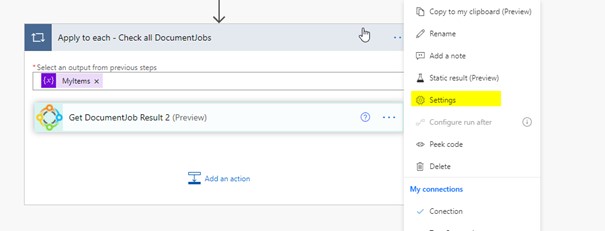

Figure 1: DocumentsCorePack Connector – Selection window

This window opens. We recommend the following changes:

Type: Exponential Interval
Count: 20
Interval: PT10S
Minimum Interval: PT10S
Maximum Interval: PT40S
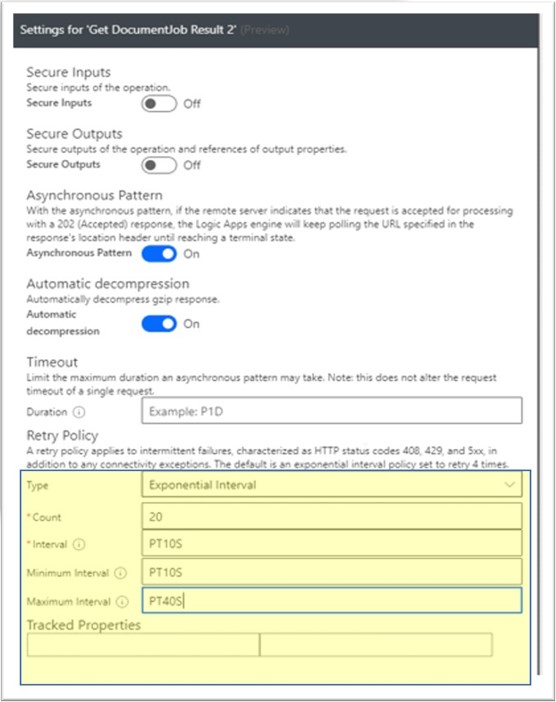

Figure 2: Settings for DCP Connector

That’s it! We appreciate your feedback! Please share your thoughts by sending an email to support@mscrm-addons.com.

Was this helpful?

1 Yes  No
Related Articles
  • How do teams automate document and PDF generation directly inside Dynamics 365?
  • Enable logging for the AutoMergeAzure Plugin for Dynamics 365 Online
  • Can DocumentsCorePack automate documents directly inside Dynamics 365 at scale?
  • What are the safest and fastest ways to automate document creation in Dynamics 365?
  • Why do document errors and inconsistencies increase as teams scale in Dynamics 365?
  • “Recipients not found” warning when using One-Click-Action
Leave A Comment Cancel reply

You must be logged in to post a comment.

Latest Articles
  • How do teams automate document and PDF generation directly inside Dynamics 365?
  • Enable logging for the AutoMergeAzure Plugin for Dynamics 365 Online
  • Why Microsoft partners standardize on a single Dynamics 365 storage solution
  • Can DocumentsCorePack automate documents directly inside Dynamics 365 at scale?
  • Recap: Directions North America 2026
Popular Articles
  • DocumentsCorePack Template Designer – Getting Started
  • Step-by-Step: How to configure a One-Click-Action
  • Application Access for Dynamics 365
  • How licenses are counted
  • How to find your environment’s unique name in Microsoft Dynamics 365
Top Rated Articles
  • “Undefined”-labels in Chrome and Edge 114 and higher
  • How to insert Condition Fields in DocumentsCorePack Templates designer
  • Important information for Dynamics 365 online customers using DocumentsCorePack and/or AttachmentExtractor
  • How to activate the DocumentsCorePack Connector for PowerApps & Microsoft Flow
  • How licenses are counted
Categories
  • *News and General Infos* 76
  • Webinars 48
  • Template Designer(DCP 197
  • DocumentsCorePack(DCP 272
  • TelephoneIntegration (TI 65
  • AttachmentExtractor (AE 80
  • PowerSearch (PS 50
  • ActivityTools (AT 61
  • SmartBar (SB 54
  • GroupCalendar (GC 47
Our Vision

“We see it as our purpose to provide products that simplify and speed up our customers’ Microsoft Dynamics 365 experience.”

Knowledgebase
LogIn
mscrm-addons.com
  • Products
  • Online Shop
  • Downloads
  • My Account
About Us
  • About Us
  • Case Studies
  • Newsletter
  • Partner Program
  • Contact
Support
  • Support
  • Terms & Conditions
  • Documentation
  • Webinars
  • Legal Documents
  • Impressum
  • Cookies
  • © 2025 www.mscrm-addons.com. All Rights Reserved.