mscrm-addons.com logomscrm-addons.com logo
  • Release History
  • Knowledge Base
  • Documentation
  • Contact Support
  • Release History
  • Knowledge Base
  • Documentation
  • Contact Support
home/Knowledge Base/DocumentsCorePack(DCP)/Updating Legacy SharePoint Connections 

Updating Legacy SharePoint Connections 

166 views 0

Some credentials used to access the DocumentsCorePack Online Service Configuration use authentication methods that are no longer supported by Microsoft.  Currently, it is recommended to switch to one of the more modern authentication methods, those being Office 365 Authentication and App Access Authentication.  If you need to change your credentials, please read the following guide.  

Updating your connection credentials 

To change your connection credentials, access your service via the DocumentsCorePack Online Service Configuration.  Within the Configuration tab, click the Edit button under SharePoint Details.
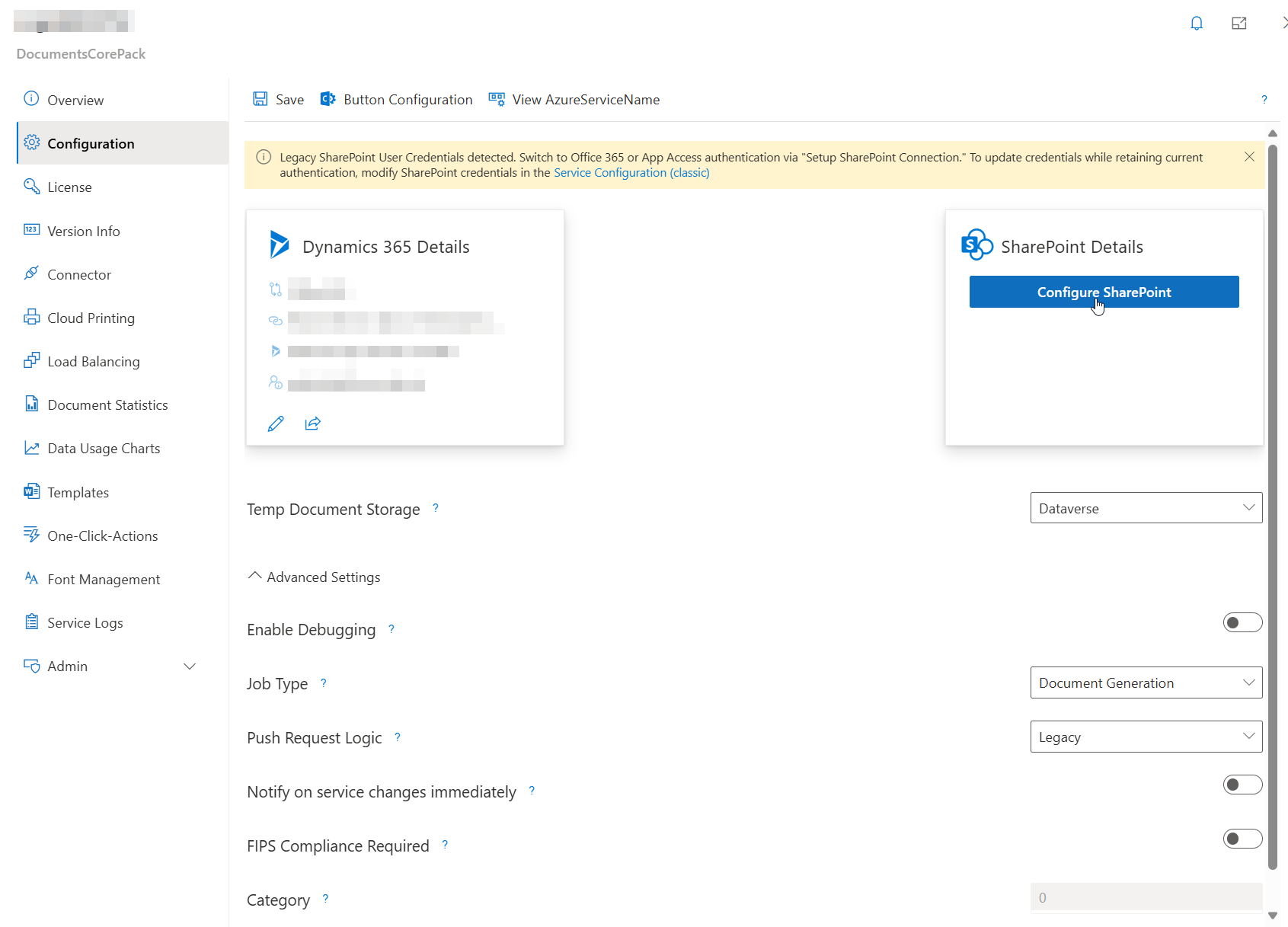
Accessing the Configuration tab
Figure 1: Accessing the Configuration tab

From the following window, you can change your connection type to either Office 365 or App Access.  Select your preferred option and click Edit Connection.  Then, enter your credentials and save your service. 
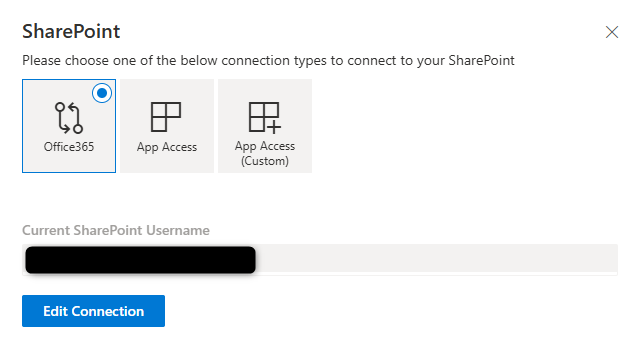
Editing your connection type
Figure 2: Editing your connection type

Was this helpful?

Yes  No
Related Articles
  • What are the safest and fastest ways to automate document creation in Dynamics 365?
  • Why do document errors and inconsistencies increase as teams scale in Dynamics 365?
  • “Recipients not found” warning when using One-Click-Action
  • What makes a Dynamics 365 add-on easy for partners to recommend in every deal 
  • Enhancing data security for DCP and AE using a virtual network
  • Security issues when installing DocumentsCorePack (Defender)
Latest Articles
  • What are the safest and fastest ways to automate document creation in Dynamics 365?
  • Recap: Canadian Power Platform Summit 2026
  • What makes a partner tool defensible during budget pushback?
  • What are safe ways to reduce Dynamics 365 storage without deleting records? 
  • Why do document errors and inconsistencies increase as teams scale in Dynamics 365?
Popular Articles
  • DocumentsCorePack Template Designer – Getting Started
  • Step-by-Step: How to configure a One-Click-Action
  • Application Access for Dynamics 365
  • How licenses are counted
  • How to find your environment’s unique name in Microsoft Dynamics 365
Top Rated Articles
  • “Undefined”-labels in Chrome and Edge 114 and higher
  • How to insert Condition Fields in DocumentsCorePack Templates designer
  • Important information for Dynamics 365 online customers using DocumentsCorePack and/or AttachmentExtractor
  • How to activate the DocumentsCorePack Connector for PowerApps & Microsoft Flow
  • How licenses are counted
Categories
  • *News and General Infos* 73
  • Webinars 47
  • Template Designer(DCP 197
  • DocumentsCorePack(DCP 269
  • TelephoneIntegration (TI 65
  • AttachmentExtractor (AE 79
  • PowerSearch (PS 50
  • ActivityTools (AT 61
  • SmartBar (SB 54
  • GroupCalendar (GC 47
Our Vision

“We see it as our purpose to provide products that simplify and speed up our customers’ Microsoft Dynamics 365 experience.”

Knowledgebase
LogIn
mscrm-addons.com
  • Products
  • Online Shop
  • Downloads
  • My Account
About Us
  • About Us
  • Case Studies
  • Newsletter
  • Partner Program
  • Contact
Support
  • Support
  • Terms & Conditions
  • Documentation
  • Webinars
  • Legal Documents
  • Impressum
  • Cookies
  • © 2025 www.mscrm-addons.com. All Rights Reserved.