When configuring load balancing in the local DocumentsCorePack Service Configuration app, you may have noticed a setting that says, “Use Push Logic.” Push logic helps improve load balancing performance and is left enabled by default.
This article will describe the details behind push logic, its benefits, and what to do if an error occurs when enabling it. The content of this article may be useful for those using the local (self-hosted) version of the DCP Server.
Overview
Normally, if a document generation request is made, it is done by contacting Dataverse (Dynamics 365) directly. The document generation service typically checks Dataverse every few seconds to see if there are document jobs to carry out. These frequent checks can put stress on Dataverse, especially when load balancing is implemented. In cases where several documents must be generated quickly, this can cause problems, such as causing your Dataverse environment’s performance to suffer.
Push logic improves load balancing performance and helps reduce stress on Dataverse. It does this by making use of an external Azure App service—the Push Logic service–managed by mscrm-addons.com. Whenever there is a document job to perform, Dataverse raises an internal flag within the Push Logic service. The document generation service then periodically checks if there are any raised flags within the Push Logic service. Whenever a flag is raised, the document generation service will then begin work on the available document job.
Note: The Push Logic service does not interact with any data. The service only informs the document generation service if there are tasks to work on.
Benefits
The benefits of push logic can be summarized into two key points:
- Faster reactions from the document generation service since the service can communicate more frequently than with Dataverse.
- Prevents putting stress upon Dataverse due to it being contacted less.
Error Handling
If the external service cannot be reached, such as in cases where our external address (https://dcppushrequest.mscrm-addons.com) is blocked by your IT department, you may encounter the following warning:
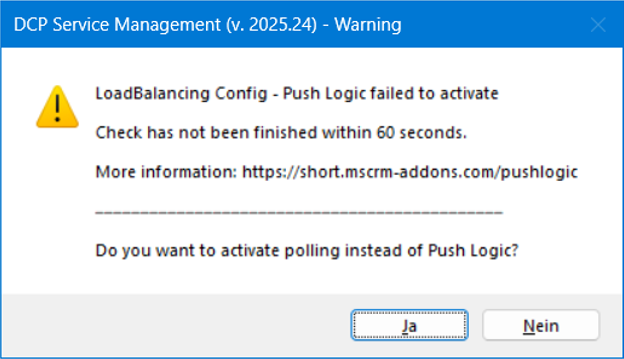
This warning can be fixed simply by clicking “Yes“. This will deactivate push logic. In doing so, load balancing still can be used, however, you may notice that your service will not perform as efficiently and Dataverse will have to handle the higher load.