mscrm-addons.com logomscrm-addons.com logo
  • Release History
  • Knowledge Base
  • Documentation
  • Contact Support
  • Release History
  • Knowledge Base
  • Documentation
  • Contact Support
home/Knowledge Base/*News and General Infos*/Recap: Power Platform Community Conference 2025

Recap: Power Platform Community Conference 2025

1231 views 0

Last week, more than 7,400 Power Platform enthusiasts gathered in Las Vegas for the 2025 Power Platform Community Conference. The event delivered an impressive mix of keynotes, deep-dive sessions, and hands-on learning – all centered around the future of low-code innovation and AI-driven productivity.

Copilot and AI agents were the clear stars of the show. Microsoft introduced the new App Builder and Workflows Agent for Microsoft 365 Copilot users, reinforcing the message from Charles Lamanna’s keynote: “these tools are reshaping how makers build, automate, and scale their ideas”.


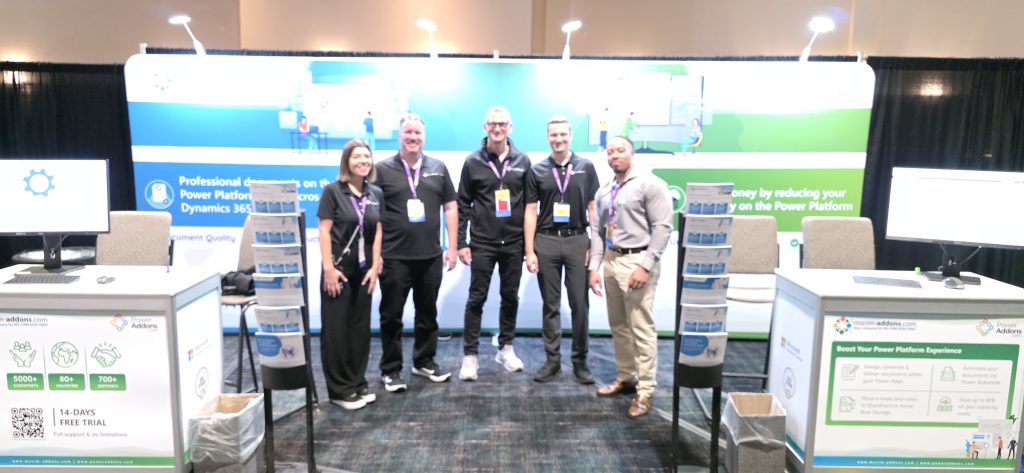
At our booth, we had the chance to connect with many customers, partners, and new faces who were eager to explore how our solutions can simplify document generation and optimize storage across Dataverse and Dynamics 365. It was great to see just how many organizations are now building on Dataverse – creating a natural fit for what we do. Even more rewarding was hearing firsthand how our existing customers are benefitting from our add-ons in their daily processes.

A big thank-you to everyone who stopped by to chat, share feedback, or learn more about our products. PPCC 2025 reminded us once again why the Power Platform community is one of the most engaging and forward-thinking out there.

We can’t wait to see what’s next, and we’ll definitely be back!

Was this helpful?

Yes  No
Related Articles
  • Recap: Scottish Summit 2026
  • Recap: Nordic Summit 2026
  • Recap: Dynamics 365 & Power Platform User Group UK
  • Recap: European Power Platform Conference 2026
  • Recap: DynamicsMinds 2026
  • Recap: European BizzApps Summit 2026
Leave A Comment Cancel reply

You must be logged in to post a comment.

Latest Articles
  • Can You Customize Business Central Document Layouts Without RDLC or Developer Support? 
  • Introducing DocumentsCorePack for Business Central
  • Hiding Table Rows in Word Templates
  • Creating a Conditional Row in a Table 
  • Recap: Scottish Summit 2026
Popular Articles
  • DocumentsCorePack Template Designer – Getting Started
  • Step-by-Step: How to configure a One-Click-Action
  • Application Access for Dynamics 365
  • How licenses are counted
  • How to find your environment’s unique name in Microsoft Dynamics 365
Top Rated Articles
  • “Undefined”-labels in Chrome and Edge 114 and higher
  • How to insert Condition Fields in DocumentsCorePack Templates designer
  • Important information for Dynamics 365 online customers using DocumentsCorePack and/or AttachmentExtractor
  • How to activate the DocumentsCorePack Connector for PowerApps & Microsoft Flow
  • Step-by-Step: How to configure a One-Click-Action
Categories
  • DCP for BC 2
  • *News and General Infos* 85
  • Webinars 50
  • Template Designer(DCP 200
  • DocumentsCorePack(DCP 278
  • TelephoneIntegration (TI 65
  • AttachmentExtractor (AE 81
  • PowerSearch (PS 50
  • ActivityTools (AT 61
  • SmartBar (SB 54
  • GroupCalendar (GC 47
Our Vision

“We see it as our purpose to provide products that simplify and speed up our customers’ Microsoft Dynamics 365 experience.”

Knowledgebase
LogIn
mscrm-addons.com
  • Products
  • Online Shop
  • Downloads
  • My Account
About Us
  • About Us
  • Case Studies
  • Newsletter
  • Partner Program
  • Contact
Support
  • Support
  • Terms & Conditions
  • Documentation
  • Webinars
  • Legal Documents
  • Impressum
  • Cookies
  • © 2025 www.mscrm-addons.com. All Rights Reserved.