mscrm-addons.com logomscrm-addons.com logo
  • Release History
  • Knowledge Base
  • Documentation
  • Contact Support
  • Release History
  • Knowledge Base
  • Documentation
  • Contact Support
home/Knowledge Base/Template Designer(DCP)/Upload sample templates

Upload sample templates

409 views 0 Updated on July 26, 2022

This article outlines how to upload sample templates with the DocumentsCorePack Client. (Version 6.5 or higher)

Open an MS Word template and go to the “www.mscrm-addons.com”-tab ❶. Hit the “DocumentsCorePack Settings” ❷.


Figure 1: Open the DCP settings

This “DocumentsCorePack Settings“-window opens.
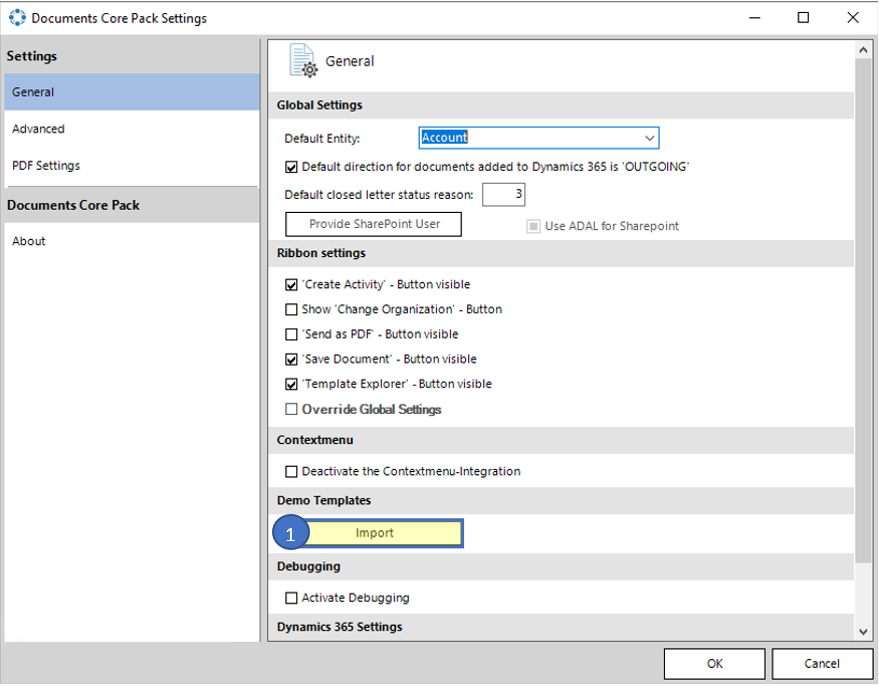

Figure 2: DocumentsCorePack Settings

Click on [Import] ❶ and DocumentsCorePack will start to upload sample templates automatically. In case the sample templates have already been uploaded, you will receive an according message.
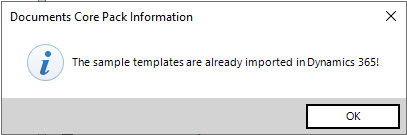

Figure 3: Info message

Once finished, the sample templates are uploaded and ready for use. You can open them by a click on “Open Template”.

That’s it! We appreciate your feedback! Please share your thoughts by sending an email to support@mscrm-addons.com.

Was this helpful?

Yes  No
Related Articles
  • Hiding Table Rows in Word Templates
  • Creating a Conditional Row in a Table 
  • Why do companies struggle to automate document processes in Dynamics 365?
  • Debugging the Template Designer Office Add-In 
  • Introducing the DocumentsCorePack Template Designer Office Add-In
  • Ensuring correct time zone display for DateTime fields
Latest Articles
  • Can You Customize Business Central Document Layouts Without RDLC or Developer Support? 
  • Introducing DocumentsCorePack for Business Central
  • Hiding Table Rows in Word Templates
  • Creating a Conditional Row in a Table 
  • Recap: Scottish Summit 2026
Popular Articles
  • DocumentsCorePack Template Designer – Getting Started
  • Step-by-Step: How to configure a One-Click-Action
  • Application Access for Dynamics 365
  • How licenses are counted
  • How to find your environment’s unique name in Microsoft Dynamics 365
Top Rated Articles
  • “Undefined”-labels in Chrome and Edge 114 and higher
  • How to insert Condition Fields in DocumentsCorePack Templates designer
  • Important information for Dynamics 365 online customers using DocumentsCorePack and/or AttachmentExtractor
  • How to activate the DocumentsCorePack Connector for PowerApps & Microsoft Flow
  • Step-by-Step: How to configure a One-Click-Action
Categories
  • DCP for BC 2
  • *News and General Infos* 85
  • Webinars 50
  • Template Designer(DCP 200
  • DocumentsCorePack(DCP 278
  • TelephoneIntegration (TI 65
  • AttachmentExtractor (AE 81
  • PowerSearch (PS 50
  • ActivityTools (AT 61
  • SmartBar (SB 54
  • GroupCalendar (GC 47
Our Vision

“We see it as our purpose to provide products that simplify and speed up our customers’ Microsoft Dynamics 365 experience.”

Knowledgebase
LogIn
mscrm-addons.com
  • Products
  • Online Shop
  • Downloads
  • My Account
About Us
  • About Us
  • Case Studies
  • Newsletter
  • Partner Program
  • Contact
Support
  • Support
  • Terms & Conditions
  • Documentation
  • Webinars
  • Legal Documents
  • Impressum
  • Cookies
  • © 2025 www.mscrm-addons.com. All Rights Reserved.