mscrm-addons.com logomscrm-addons.com logo
  • Release History
  • Knowledge Base
  • Documentation
  • Contact Support
  • Release History
  • Knowledge Base
  • Documentation
  • Contact Support
home/Knowledge Base/AttachmentExtractor (AE)/How much data & file capacity can you save by moving email content and file attachments?

How much data & file capacity can you save by moving email content and file attachments?

3342 views 4 Updated on February 25, 2026

Please note: These numbers are based on the status of April 2023. Throughout 2023 email-content will no longer count towards data capacity impacting the potential savings. Learn more

The AttachmentExtractor for Dynamics 365 and PoweApps moves content (emails and files) from Dataverse to SharePoint or an AzureBlob. Doing so significantly reduces data and file capacity consumption. As a result, you save costs by avoiding expensive Capacity Add-ons for Dataverse.

The big question is: How much money can I save?

This article describes the steps to take to get a good idea of the potential savings for your tenant.

How to Estimate your data & file Capacity savings:

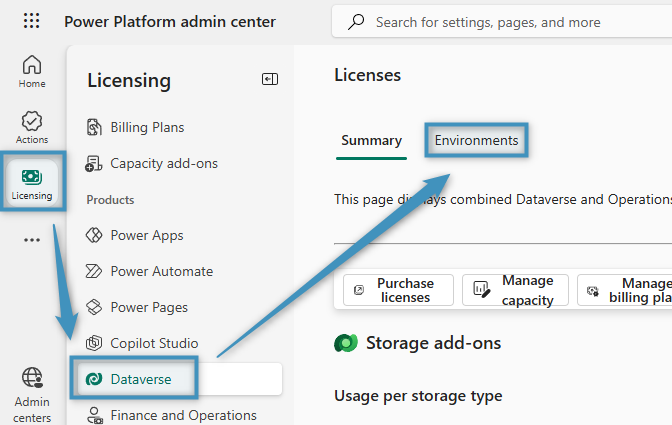
  1. First, go to the “Power Platform Admin Center” and log in to your tenant.
  2. Navigate to “Licensing” -> “Dataverse” ->”Environments“.
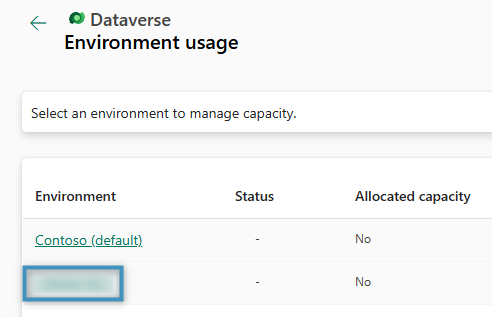
  3. Select your environment.
Figure 1a: Navigating to your environment
Figure 1b: Selecting your environment

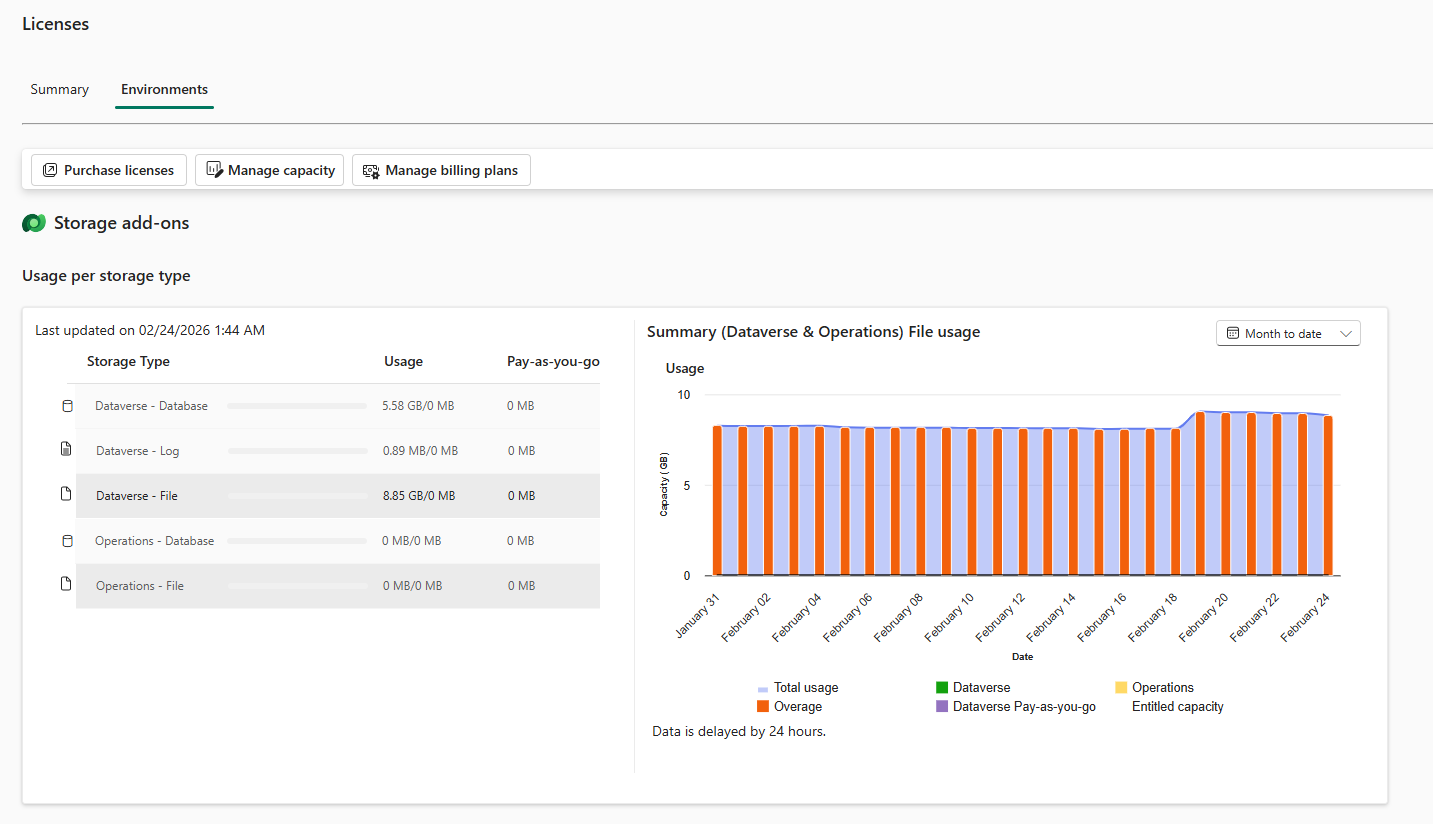
The following window appears:

Figure 2: Overview of data and file capacity consumption

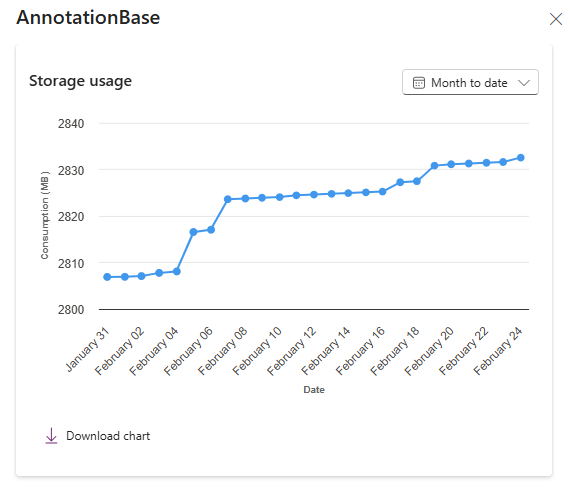
By scrolling down, you can find and open the ActivityPointerBase, Attachment, and AnnotationBase tables and view their size.
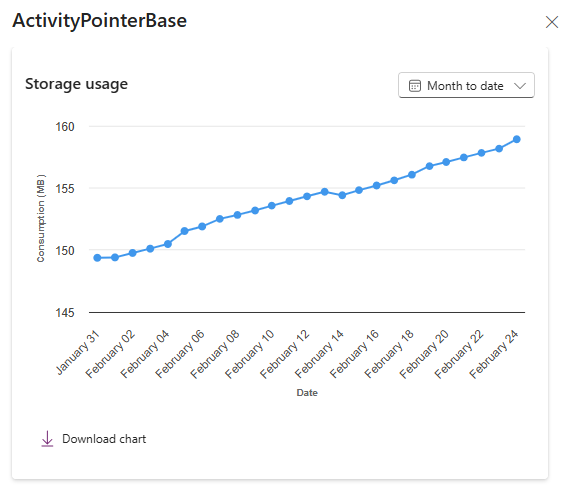
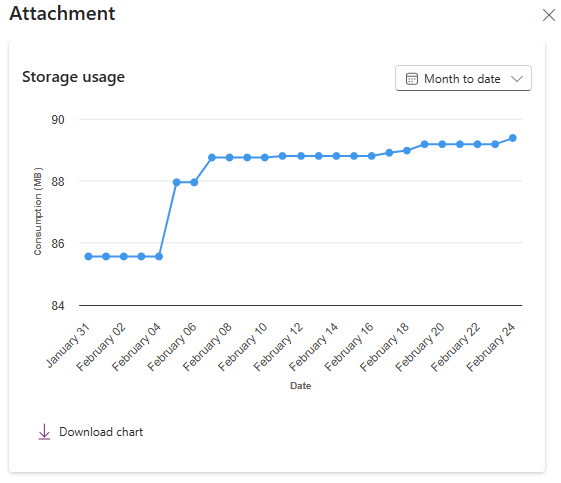
Now you can estimate your potential savings:

  1. Data Capacity Savings: Moving email content will shrink the ActivityPointerBase table around between 35-40%. Thus, we recommend 40% for your estimate.
  2. File Capacity Savings: Moving file attachments will shrink the Attachment and AnnotationBase table between 60-90%. Thus, we recommend 80% for your estimate.
Table to shrinkSize
(GB)
Reduction*
(GB)
Cost**
(USD)
Annual savings
USD
Data capacityActivityPointerBase14 5.6 (~40%)402688
File capacityAttachment, AnnotationBase2016 (~80%)2384
Table 1: Table showing how to estimate your savings based on Figure 2

To calculate your data and cost savings, try our AttachmentExtractor Calculator.

The result

The following screenshot shows the effect of AttachmentExtractor on capacity. As can be seen, data and file capacity is reduced at considerably rates.
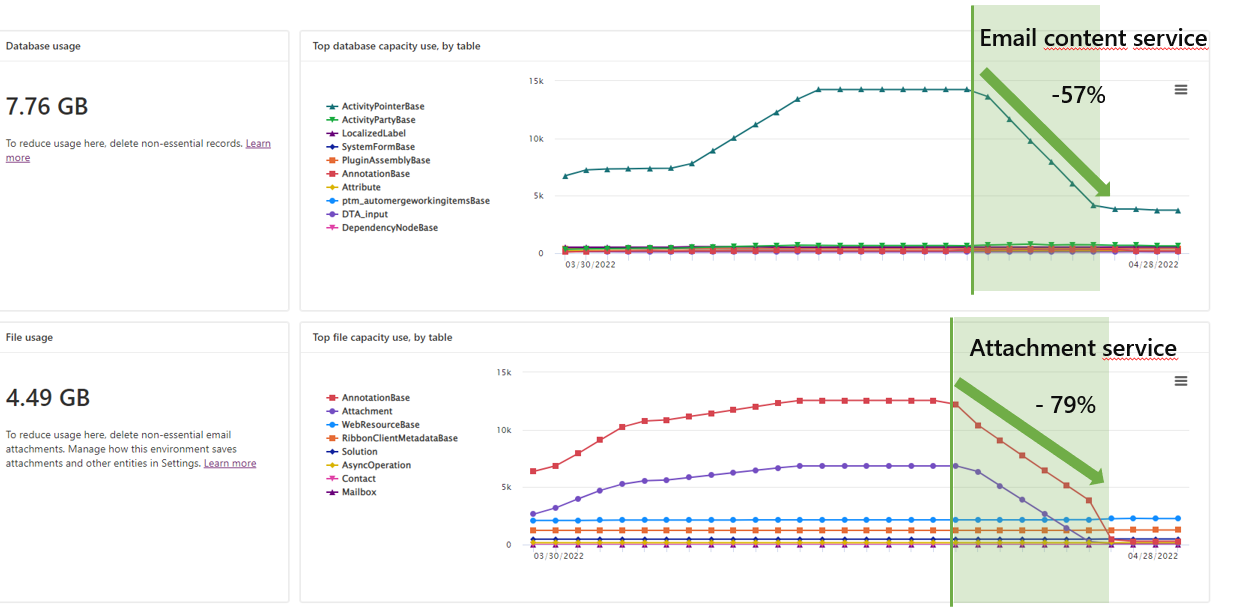
Graph showing the impact of AttachmentExtractor on data and file capacity. It indicates high reduction on both.
Figure 3: Impact of AttachmentExtractor on file and data capacity

To summarize: If you are tracking emails in Dynamics 365 or Dataverse you will probably find those tables to be significantly larger. Hence, savings can go up to thousands of dollars per month.

Helpful information:

  • Information: AttachmentExtractor for Dynamics 365
  • Free Trial: AttachmentExtractor – Getting Started

Was this helpful?

4 Yes  No
Related Articles
  • Recap: Canadian Power Platform Summit 2026
  • What makes a partner tool defensible during budget pushback?
  • What are safe ways to reduce Dynamics 365 storage without deleting records? 
  • What makes a Dynamics 365 add-on easy for partners to recommend in every deal 
  • What actually counts toward Dataverse storage costs (and what doesn’t)?
  • Recap: Arctic Cloud Developer Challenge
Leave A Comment Cancel reply

You must be logged in to post a comment.

Latest Articles
  • What are the safest and fastest ways to automate document creation in Dynamics 365?
  • Recap: Canadian Power Platform Summit 2026
  • What makes a partner tool defensible during budget pushback?
  • What are safe ways to reduce Dynamics 365 storage without deleting records? 
  • Why do document errors and inconsistencies increase as teams scale in Dynamics 365?
Popular Articles
  • DocumentsCorePack Template Designer – Getting Started
  • Step-by-Step: How to configure a One-Click-Action
  • Application Access for Dynamics 365
  • How licenses are counted
  • How to find your environment’s unique name in Microsoft Dynamics 365
Top Rated Articles
  • “Undefined”-labels in Chrome and Edge 114 and higher
  • How to insert Condition Fields in DocumentsCorePack Templates designer
  • Important information for Dynamics 365 online customers using DocumentsCorePack and/or AttachmentExtractor
  • How to activate the DocumentsCorePack Connector for PowerApps & Microsoft Flow
  • How licenses are counted
Categories
  • *News and General Infos* 73
  • Webinars 47
  • Template Designer(DCP 197
  • DocumentsCorePack(DCP 269
  • TelephoneIntegration (TI 65
  • AttachmentExtractor (AE 79
  • PowerSearch (PS 50
  • ActivityTools (AT 61
  • SmartBar (SB 54
  • GroupCalendar (GC 47
Our Vision

“We see it as our purpose to provide products that simplify and speed up our customers’ Microsoft Dynamics 365 experience.”

Knowledgebase
LogIn
mscrm-addons.com
  • Products
  • Online Shop
  • Downloads
  • My Account
About Us
  • About Us
  • Case Studies
  • Newsletter
  • Partner Program
  • Contact
Support
  • Support
  • Terms & Conditions
  • Documentation
  • Webinars
  • Legal Documents
  • Impressum
  • Cookies
  • © 2025 www.mscrm-addons.com. All Rights Reserved.