mscrm-addons.com logomscrm-addons.com logo
  • Release History
  • Knowledge Base
  • Documentation
  • Contact Support
  • Release History
  • Knowledge Base
  • Documentation
  • Contact Support
home/Knowledge Base/DocumentsCorePack(DCP)/Force Service to be the only document-generating service

Force Service to be the only document-generating service

281 views 0 Updated on October 11, 2023

There are scenarios where it is required to re-link a Dynamics 365 environment to the respective DocumentsCorePack Service.

Example: You have DocumentsCorePack configured for your production and sandbox environments. When you now perform a copy of your production environment to one of your sandboxes (e.g., UAT ) the settings key of the sandbox no longer points to the correct DocumentsCorePack service. As a result, you will no longer be able to generate documents in your sandbox.

This article outlines how to reset the link by enforcing the service as the only document-generating service for a specific Dynamics 365 environment.

IMPORTANT: Do not perform this action if you have Load-Balancing enabled.

Step-by-step description

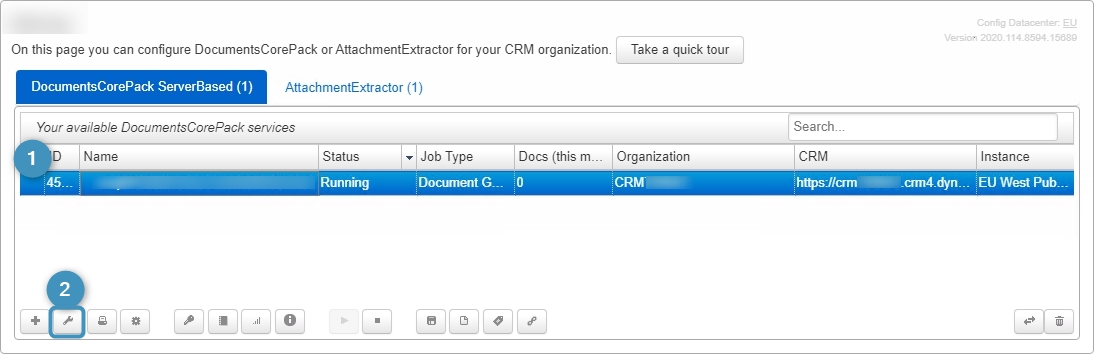
Step 1: Open the DocumentsCorePack Service Configuration and locate the service you want to re-link.

Open DocumentsCorePack service
Figure 1: DocumentsCorePack Service Configuration

Step 2: Click on the wrench symbol to open the Service Configuration and select Show Advanced Options.
Open Service Configuration
Figure 2: Open Service Configuration

Step 3: Check the ❶ Force this service to be the only document-generating service checkbox. This will update the setting inside the connected environment to point to this service. Don´t forget to ❷ Save the Service.

Force this service to be the only document-generating service
Figure 3: Force this service to be the only document-generating service

Step 3: Once the connection is fixed and there are unfinsihed documetns waiting, the Service will start creating documents (if there are pending jobs) as you can see with a click of the View Service Logs button.

View Service Logs
Figure 4: View Service Logs

Here you can see all of the jobs currently created.
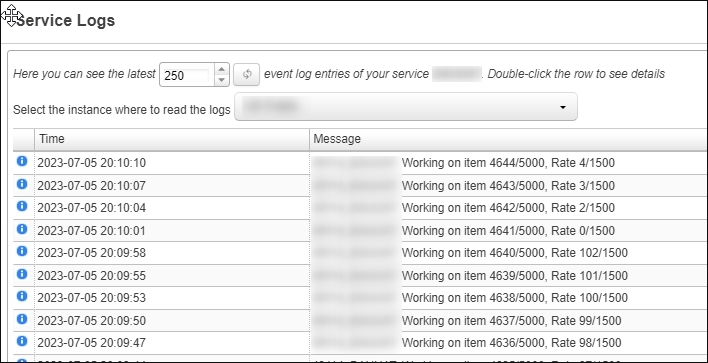
Service Logs
Figure 5: Service Logs

That’s it! We appreciate your feedback! Please share your thoughts by sending an email to support@mscrm-addons.com.

Was this helpful?

Yes  No
Related Articles
  • Security issues when installing DocumentsCorePack (Defender)
  • Locating Raw Inputs and Outputs in Power Automate
  • Step by Step: How to execute an OCA in a Power Automate flow 
  • Stop Losing Time & Money: How Manual Document Processes Hurt Your Business
  • Debugging the Template Design Office Add-In 
  • Updating Legacy SharePoint Connections 
Latest Articles
  • The Hidden Inefficiencies Inside Dynamics 365 and How Smart Teams Are Solving Them
  • mscrm-addons.com: 2025 Year in Review
  • Security issues when installing DocumentsCorePack (Defender)
  • AttachmentExtractor: Bandwidth & Performance – FAQ 
  • Recap: Power Platform Community Conference 2025
Popular Articles
  • DocumentsCorePack Template Designer – Getting Started
  • Step-by-Step: How to configure a One-Click-Action
  • Application Access for Dynamics 365
  • How licenses are counted
  • How to find your environment’s unique name in Microsoft Dynamics 365
Top Rated Articles
  • “Undefined”-labels in Chrome and Edge 114 and higher
  • How to insert Condition Fields in DocumentsCorePack Templates designer
  • Important information for Dynamics 365 online customers using DocumentsCorePack and/or AttachmentExtractor
  • How to activate the DocumentsCorePack Connector for PowerApps & Microsoft Flow
  • How licenses are counted
Categories
  • *News and General Infos* 70
  • Webinars 47
  • Template Designer(DCP 197
  • DocumentsCorePack(DCP 264
  • TelephoneIntegration (TI 65
  • AttachmentExtractor (AE 76
  • PowerSearch (PS 50
  • ActivityTools (AT 61
  • SmartBar (SB 54
  • GroupCalendar (GC 47
Our Vision

“We see it as our purpose to provide products that simplify and speed up our customers’ Microsoft Dynamics 365 experience.”

Knowledgebase
LogIn
mscrm-addons.com
  • Products
  • Online Shop
  • Downloads
  • My Account
About Us
  • About Us
  • Case Studies
  • Newsletter
  • Partner Program
  • Contact
Support
  • Support
  • Terms & Conditions
  • Documentation
  • Webinars
  • Legal Documents
  • Impressum
  • © 2025 www.mscrm-addons.com. All Rights Reserved.