mscrm-addons.com logomscrm-addons.com logo
  • Release History
  • Knowledge Base
  • Documentation
  • Contact Support
  • Release History
  • Knowledge Base
  • Documentation
  • Contact Support
home/Knowledge Base/DocumentsCorePack(DCP)/“Recipients not found” warning when using One-Click-Action

“Recipients not found” warning when using One-Click-Action

53 views 0

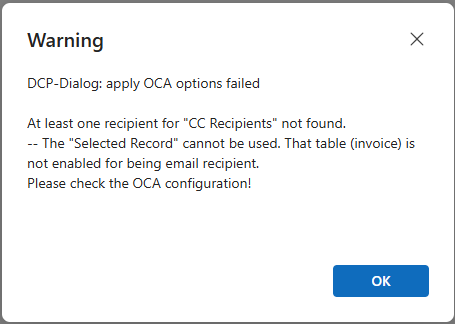
Figure 1: "CC Recipients" warning
Figure 1: “CC Recipients” warning

This issue may occur if an entity that is not enabled to be an email recipient is defined in a One-Click-Action (OCA) as a “To”, “BCC”, or “CC” recipient.

In this example, the problematic record is an invoice record.  To fix the issue, the user should edit the corresponding OCA to remove or replace the record. 
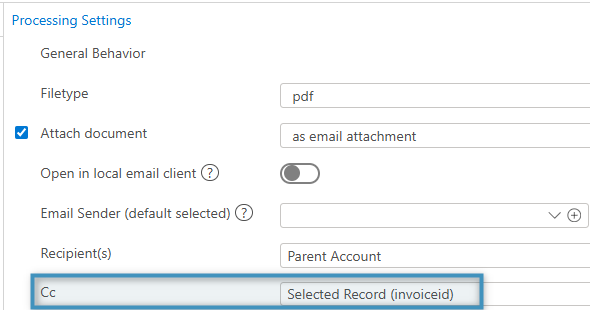
Figure 2: The CC field configured with a problematic invoice

If the issue persists, the user should contact our support team (support@mscrm-addons.com). 

Tags:OCAone click actiondialogwarningrecipients not found

Was this helpful?

Yes  No
Related Articles
  • Why do document errors and inconsistencies increase as teams scale in Dynamics 365?
  • What makes a Dynamics 365 add-on easy for partners to recommend in every deal 
  • Enhancing data security for DCP and AE using a virtual network
  • Security issues when installing DocumentsCorePack (Defender)
  • Locating Raw Inputs and Outputs in Power Automate
  • Step by Step: How to execute an OCA in a Power Automate flow 
Latest Articles
  • What makes a partner tool defensible during budget pushback?
  • What are safe ways to reduce Dynamics 365 storage without deleting records? 
  • Why do document errors and inconsistencies increase as teams scale in Dynamics 365?
  • “Recipients not found” warning when using One-Click-Action
  • What makes a Dynamics 365 add-on easy for partners to recommend in every deal 
Popular Articles
  • DocumentsCorePack Template Designer – Getting Started
  • Step-by-Step: How to configure a One-Click-Action
  • Application Access for Dynamics 365
  • How licenses are counted
  • How to find your environment’s unique name in Microsoft Dynamics 365
Top Rated Articles
  • “Undefined”-labels in Chrome and Edge 114 and higher
  • How to insert Condition Fields in DocumentsCorePack Templates designer
  • Important information for Dynamics 365 online customers using DocumentsCorePack and/or AttachmentExtractor
  • How to activate the DocumentsCorePack Connector for PowerApps & Microsoft Flow
  • How licenses are counted
Categories
  • *News and General Infos* 72
  • Webinars 47
  • Template Designer(DCP 197
  • DocumentsCorePack(DCP 268
  • TelephoneIntegration (TI 65
  • AttachmentExtractor (AE 79
  • PowerSearch (PS 50
  • ActivityTools (AT 61
  • SmartBar (SB 54
  • GroupCalendar (GC 47
Our Vision

“We see it as our purpose to provide products that simplify and speed up our customers’ Microsoft Dynamics 365 experience.”

Knowledgebase
LogIn
mscrm-addons.com
  • Products
  • Online Shop
  • Downloads
  • My Account
About Us
  • About Us
  • Case Studies
  • Newsletter
  • Partner Program
  • Contact
Support
  • Support
  • Terms & Conditions
  • Documentation
  • Webinars
  • Legal Documents
  • Impressum
  • Cookies
  • © 2025 www.mscrm-addons.com. All Rights Reserved.