mscrm-addons.com logomscrm-addons.com logo
  • Release History
  • Knowledge Base
  • Documentation
  • Contact Support
  • Release History
  • Knowledge Base
  • Documentation
  • Contact Support
home/Knowledge Base/PowerSearch (PS)/PowerSearch for Dynamics 365 – Extended Features

PowerSearch for Dynamics 365 – Extended Features

244 views 0 Updated on April 30, 2024

This article outlines how you can activate extended features of PowerSearch.
Steps described here can be necessary after installing PowerSearch from Microsoft AppSource or after a manual solution import.


1. Warning messages or notifications

If you get one of the underneath warning messages or notifications it is an indicator that the “PowerSearchPluginExtension” solution is not installed.

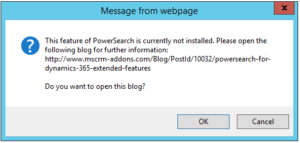
Figure 1: Message from webpage

Please follow these steps to install it:
• Download the “Extended Solutions” via the Download Link and extract the zip file:
(compatible with the PowerSearch version 2020.20)


• Open Dynamics 365 -> Advanced Settings -> Settings -> Solutions -> hit “Import”
• In the popping up dialog select the “PowerSearchPluginExtension.zip” and follow the wizard.
(here you can find details about how to install solutions manually: Article Link)

After refreshing the Dynamics 365 page the functionality should be available.


2. Missing PowerSearch global button

The [POWERSEARCH]-button is not available in the global Dynamics 365 menu.

This is the case if the „PowerSearchPluginGlobalButton” solution is missing in your organization.

Please follow these steps to install it:
• Download the “Extended Solutions” via the Download Link and extract the zip file:
(compatible with the PowerSearch version 2020.20)


• Open Dynamics 365 -> Advanced Settings -> Settings -> Solutions -> hit “Import”
• In the popping up dialog select the “PowerSearchPluginGlobalButton.zip” and follow the wizard.
(here you can find details about how to install solutions manually: Article Link)

After refreshing the Dynamics 365 page the functionality should be available.


Support

In case of any questions or problems please do not hesitate to contact our support: Support Link

That’s it! We appreciate your feedback! Please share your thoughts by sending an email to support@mscrm-addons.com.​

reworkneeded.. what are extended features.. check pictures

Was this helpful?

Yes  No
Related Articles
  • How to activate per User Licensing in CRM 2011
  • Final PowerSearch installation steps after MS AppSource download
  • How to use Tolerance Control for number search fields in PowerSearch
  • PowerSearch – How to install license with subscription number/ID 
  • PowerSearch – How to install the license key for perpetual License
  • How to access mscrm-addons product settings in Dynamics 365
Latest Articles
  • Why do document errors and inconsistencies increase as teams scale in Dynamics 365?
  • “Recipients not found” warning when using One-Click-Action
  • What makes a Dynamics 365 add-on easy for partners to recommend in every deal 
  • What actually counts toward Dataverse storage costs (and what doesn’t)?
  • Enhancing data security for DCP and AE using a virtual network
Popular Articles
  • DocumentsCorePack Template Designer – Getting Started
  • Step-by-Step: How to configure a One-Click-Action
  • Application Access for Dynamics 365
  • How licenses are counted
  • How to find your environment’s unique name in Microsoft Dynamics 365
Top Rated Articles
  • “Undefined”-labels in Chrome and Edge 114 and higher
  • How to insert Condition Fields in DocumentsCorePack Templates designer
  • Important information for Dynamics 365 online customers using DocumentsCorePack and/or AttachmentExtractor
  • How to activate the DocumentsCorePack Connector for PowerApps & Microsoft Flow
  • How licenses are counted
Categories
  • *News and General Infos* 71
  • Webinars 47
  • Template Designer(DCP 197
  • DocumentsCorePack(DCP 268
  • TelephoneIntegration (TI 65
  • AttachmentExtractor (AE 78
  • PowerSearch (PS 50
  • ActivityTools (AT 61
  • SmartBar (SB 54
  • GroupCalendar (GC 47
Our Vision

“We see it as our purpose to provide products that simplify and speed up our customers’ Microsoft Dynamics 365 experience.”

Knowledgebase
LogIn
mscrm-addons.com
  • Products
  • Online Shop
  • Downloads
  • My Account
About Us
  • About Us
  • Case Studies
  • Newsletter
  • Partner Program
  • Contact
Support
  • Support
  • Terms & Conditions
  • Documentation
  • Webinars
  • Legal Documents
  • Impressum
  • Cookies
  • © 2025 www.mscrm-addons.com. All Rights Reserved.