mscrm-addons.com logomscrm-addons.com logo
  • Release History
  • Knowledge Base
  • Documentation
  • Contact Support
  • Release History
  • Knowledge Base
  • Documentation
  • Contact Support
home/Knowledge Base/DocumentsCorePack(DCP)/Troubleshooting for Load Balancing – On-Premise

Troubleshooting for Load Balancing – On-Premise

699 views 0 Updated on July 26, 2022

This blog article outlines how to proceed if you have an issue with your Load Balancing service for DocumentsCorePack On-Premise.

1) Take screenshots of the first three tabs of the configuration of ​ALL your services that are affected by the Load Balancing issue(highlighted in yellow in the figure below):
– General-tab
– Dynamics 365 Connection Setup-tab
– License-tab ​
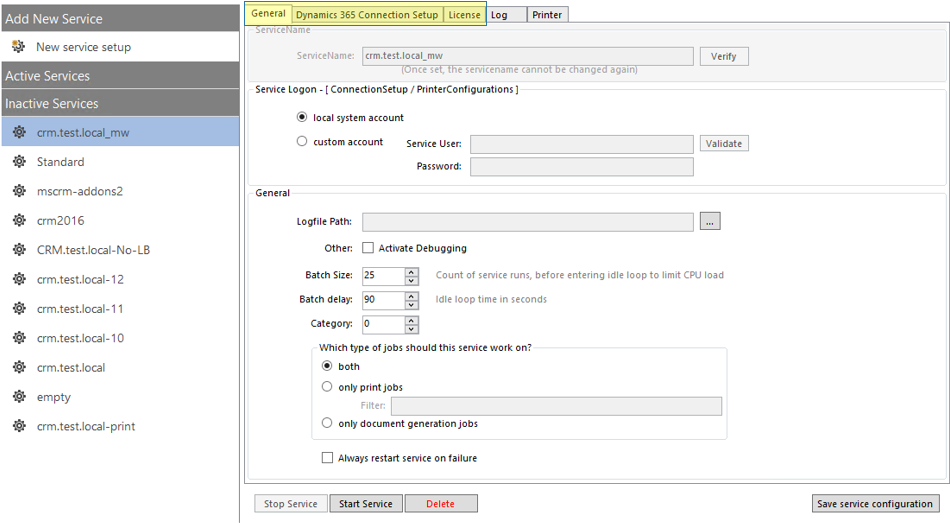

Configuration of your service
Figure 1: Configuration of your services

2) Export the AutoMergeWorkingItem entity with all fields as CSV file


Export AMWI as CSV file
Figure 2: Export AMWI as CSV file

3) Export EventLog: Applications and Services Logs – www.mscrm-addons.com folder
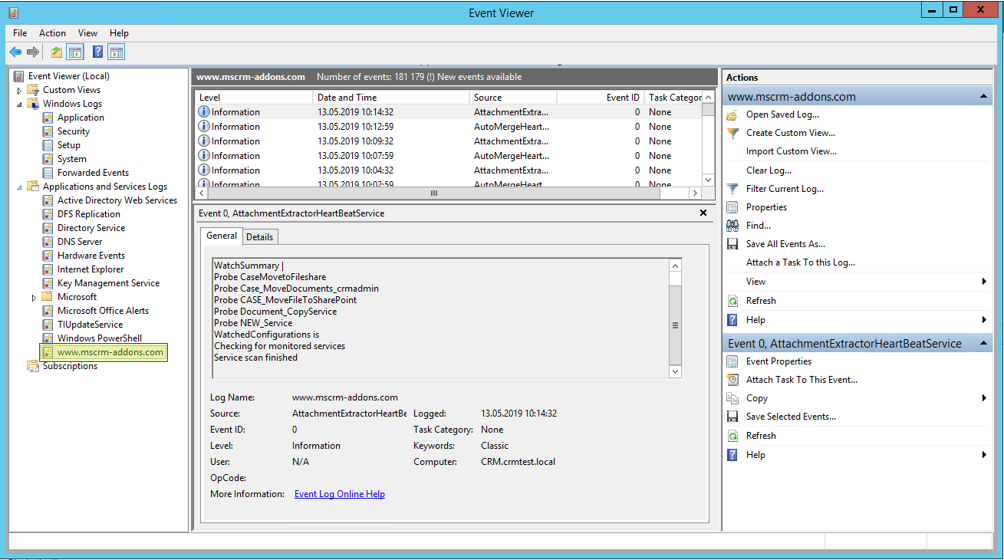

Export EventLog
Figure 3: Export EventLog

Please send all the files  and a short description on which steps were taken to support@mscrm-addons.com.

​

That’s it! We appreciate your feedback! Please share your thoughts by sending an email to support@mscrm-addons.com.

​

Was this helpful?

Yes  No
Related Articles
  • Security issues when installing DocumentsCorePack (Defender)
  • Locating Raw Inputs and Outputs in Power Automate
  • Step by Step: How to execute an OCA in a Power Automate flow 
  • Stop Losing Time & Money: How Manual Document Processes Hurt Your Business
  • Debugging the Template Design Office Add-In 
  • Updating Legacy SharePoint Connections 
Latest Articles
  • The Hidden Inefficiencies Inside Dynamics 365 and How Smart Teams Are Solving Them
  • mscrm-addons.com: 2025 Year in Review
  • Security issues when installing DocumentsCorePack (Defender)
  • AttachmentExtractor: Bandwidth & Performance – FAQ 
  • Recap: Power Platform Community Conference 2025
Popular Articles
  • DocumentsCorePack Template Designer – Getting Started
  • Step-by-Step: How to configure a One-Click-Action
  • Application Access for Dynamics 365
  • How licenses are counted
  • How to find your environment’s unique name in Microsoft Dynamics 365
Top Rated Articles
  • “Undefined”-labels in Chrome and Edge 114 and higher
  • How to insert Condition Fields in DocumentsCorePack Templates designer
  • Important information for Dynamics 365 online customers using DocumentsCorePack and/or AttachmentExtractor
  • How to activate the DocumentsCorePack Connector for PowerApps & Microsoft Flow
  • How licenses are counted
Categories
  • *News and General Infos* 70
  • Webinars 47
  • Template Designer(DCP 197
  • DocumentsCorePack(DCP 264
  • TelephoneIntegration (TI 65
  • AttachmentExtractor (AE 76
  • PowerSearch (PS 50
  • ActivityTools (AT 61
  • SmartBar (SB 54
  • GroupCalendar (GC 47
Our Vision

“We see it as our purpose to provide products that simplify and speed up our customers’ Microsoft Dynamics 365 experience.”

Knowledgebase
LogIn
mscrm-addons.com
  • Products
  • Online Shop
  • Downloads
  • My Account
About Us
  • About Us
  • Case Studies
  • Newsletter
  • Partner Program
  • Contact
Support
  • Support
  • Terms & Conditions
  • Documentation
  • Webinars
  • Legal Documents
  • Impressum
  • © 2025 www.mscrm-addons.com. All Rights Reserved.