mscrm-addons.com logomscrm-addons.com logo
  • Release History
  • Knowledge Base
  • Documentation
  • Contact Support
  • Release History
  • Knowledge Base
  • Documentation
  • Contact Support
home/Knowledge Base/DocumentsCorePack(DCP)/Wait condition issue fix in workflows

Wait condition issue fix in workflows

2139 views 0 Updated on July 25, 2023

As this can impact the behavior of other components, I would recommend to test this outside of your production environment first. Please also note the time in case you may need to revert the environment to a previous state and consider performing this out of office hours to prevent any kind of business impact:

  1. You need to have OrganizationSettingEditor installed in your environment, which I checked and seems to already be present.
  2. Open the “OrganizationSettingEditor” from Settings > Solutions
  3. Click on “ActivateAdditionalRefreshofworkflowCondition”  Edit Action button:
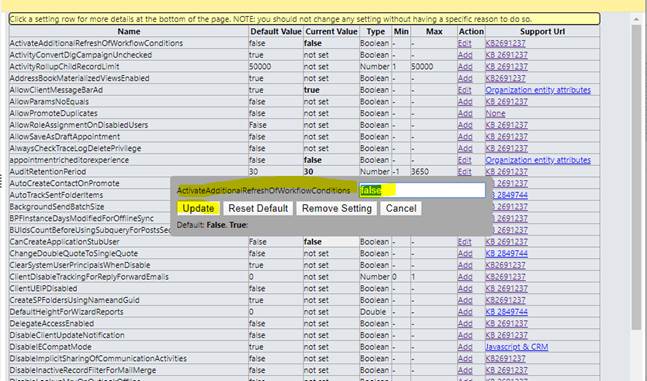
4. Change the current value from false to “true” and click on update.
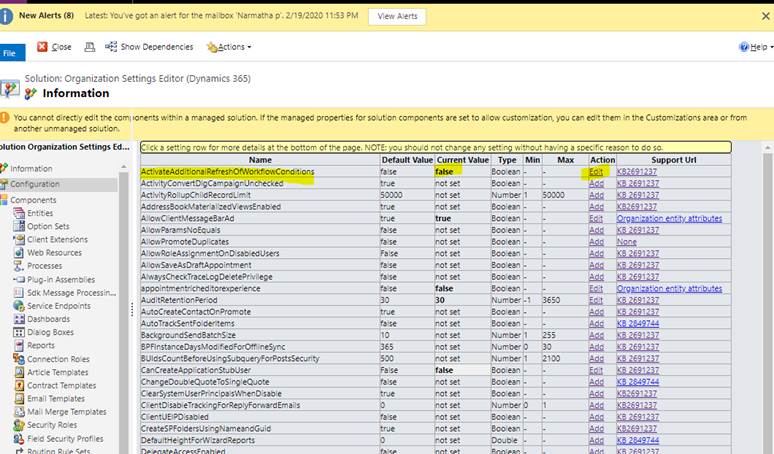
5. Once the value is updated to true, close the current solution and publish all the customization.
6. Once the changes are published, select the “system jobs” which are stuck at “waiting” state.
7. Click on resume and wait.
8. After clicking on resume, check whether the system jobs are getting changed or not.
9. If you may notice any odd behavior inside the system after this change has been performed, please revert it.

Disclaimer:
This procedure was recommended by Microsoft in the course of a support ticket. Even thou the information you can find online regarding this topic seems to be outdated this would still be a valid attempt. Please consider the described precautions!

External links:

  • OrgDBOrgSettings tool for Microsoft Dynamics CRM
  • A workflow remains in a waiting state even if the wait conditions are evaluated to be true in Microsoft Dynamics CRM 2011

That’s it! We appreciate your feedback! Please share your thoughts by sending an email to support@mscrm-addons.com.

Tags:waitconditionworkflow stuckwait conditionstatuschange

Was this helpful?

Yes  1 No
Related Articles
  • Security issues when installing DocumentsCorePack (Defender)
  • Locating Raw Inputs and Outputs in Power Automate
  • Step by Step: How to execute an OCA in a Power Automate flow 
  • Stop Losing Time & Money: How Manual Document Processes Hurt Your Business
  • Debugging the Template Design Office Add-In 
  • Updating Legacy SharePoint Connections 
Leave A Comment Cancel reply

You must be logged in to post a comment.

Latest Articles
  • The Hidden Inefficiencies Inside Dynamics 365 and How Smart Teams Are Solving Them
  • mscrm-addons.com: 2025 Year in Review
  • Security issues when installing DocumentsCorePack (Defender)
  • AttachmentExtractor: Bandwidth & Performance – FAQ 
  • Recap: Power Platform Community Conference 2025
Popular Articles
  • DocumentsCorePack Template Designer – Getting Started
  • Step-by-Step: How to configure a One-Click-Action
  • Application Access for Dynamics 365
  • How licenses are counted
  • How to find your environment’s unique name in Microsoft Dynamics 365
Top Rated Articles
  • “Undefined”-labels in Chrome and Edge 114 and higher
  • How to insert Condition Fields in DocumentsCorePack Templates designer
  • Important information for Dynamics 365 online customers using DocumentsCorePack and/or AttachmentExtractor
  • How to activate the DocumentsCorePack Connector for PowerApps & Microsoft Flow
  • How licenses are counted
Categories
  • *News and General Infos* 70
  • Webinars 47
  • Template Designer(DCP 197
  • DocumentsCorePack(DCP 264
  • TelephoneIntegration (TI 65
  • AttachmentExtractor (AE 76
  • PowerSearch (PS 50
  • ActivityTools (AT 61
  • SmartBar (SB 54
  • GroupCalendar (GC 47
Our Vision

“We see it as our purpose to provide products that simplify and speed up our customers’ Microsoft Dynamics 365 experience.”

Knowledgebase
LogIn
mscrm-addons.com
  • Products
  • Online Shop
  • Downloads
  • My Account
About Us
  • About Us
  • Case Studies
  • Newsletter
  • Partner Program
  • Contact
Support
  • Support
  • Terms & Conditions
  • Documentation
  • Webinars
  • Legal Documents
  • Impressum
  • © 2025 www.mscrm-addons.com. All Rights Reserved.