mscrm-addons.com logomscrm-addons.com logo
  • Release History
  • Knowledge Base
  • Documentation
  • Contact Support
  • Release History
  • Knowledge Base
  • Documentation
  • Contact Support
home/Knowledge Base/GroupCalendar (GC)/How to enable debugging for GroupCalendar

How to enable debugging for GroupCalendar

389 views 0 Updated on July 26, 2022

+++++++++++++++++++++++++++++++++++++++++++++++++

Please note: This article applies to Group Calendar in 
MS Dynamics CRM 2011, 2013, 2015, 2015/2016
and MS Dynamics 365

+++++++++++++++++++++++++++++++++++++++

This article only refers to GC ON PREMISE.
In case you have troubles with GC ONLINE, please contact our support via support@mscrm-addons.com

Debugging for GroupCalendar is very easy, because there is only one way to do so:

Activating debugging via the Web.config.

How to activate debugging via Web.config

Open the Web.config.

This file is located in the installation directory:

(C:\Program Files\PTM EDV-Systeme GmbH\GroupCalendar the “debug” setting and set this value to “true”.
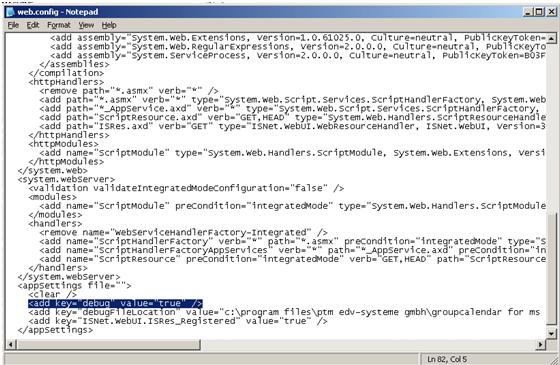
Figure 1: web.config add key
 
You can find the logfiles in the directory which is specified in the “debug FileLocation”- setting
 
Only enable debugging when you have to send us the debug files. Disable it by setting the value to “false”.

That’s it! Should you have further questions, please do not hesitate to contact us via support@mscrm-addons.com

Was this helpful?

Yes  No
Related Articles
  • How to activate per User Licensing in CRM 2011
  • How to display various activity-attributes within multiple rows in Gantt view
  • How to access mscrm-addons product settings in Dynamics 365
  • Microsoft Entra ID licensing counts explained
  • Add your GroupCalendar to the Sitemap
  • How licenses are counted
Latest Articles
  • Can You Customize Business Central Document Layouts Without RDLC or Developer Support? 
  • Introducing DocumentsCorePack for Business Central
  • Hiding Table Rows in Word Templates
  • Creating a Conditional Row in a Table 
  • Recap: Scottish Summit 2026
Popular Articles
  • DocumentsCorePack Template Designer – Getting Started
  • Step-by-Step: How to configure a One-Click-Action
  • Application Access for Dynamics 365
  • How licenses are counted
  • How to find your environment’s unique name in Microsoft Dynamics 365
Top Rated Articles
  • “Undefined”-labels in Chrome and Edge 114 and higher
  • How to insert Condition Fields in DocumentsCorePack Templates designer
  • Important information for Dynamics 365 online customers using DocumentsCorePack and/or AttachmentExtractor
  • How to activate the DocumentsCorePack Connector for PowerApps & Microsoft Flow
  • Step-by-Step: How to configure a One-Click-Action
Categories
  • DCP for BC 2
  • *News and General Infos* 85
  • Webinars 50
  • Template Designer(DCP 200
  • DocumentsCorePack(DCP 278
  • TelephoneIntegration (TI 65
  • AttachmentExtractor (AE 81
  • PowerSearch (PS 50
  • ActivityTools (AT 61
  • SmartBar (SB 54
  • GroupCalendar (GC 47
Our Vision

“We see it as our purpose to provide products that simplify and speed up our customers’ Microsoft Dynamics 365 experience.”

Knowledgebase
LogIn
mscrm-addons.com
  • Products
  • Online Shop
  • Downloads
  • My Account
About Us
  • About Us
  • Case Studies
  • Newsletter
  • Partner Program
  • Contact
Support
  • Support
  • Terms & Conditions
  • Documentation
  • Webinars
  • Legal Documents
  • Impressum
  • Cookies
  • © 2025 www.mscrm-addons.com. All Rights Reserved.