mscrm-addons.com logomscrm-addons.com logo
  • Release History
  • Knowledge Base
  • Documentation
  • Contact Support
  • Release History
  • Knowledge Base
  • Documentation
  • Contact Support
home/Knowledge Base/DocumentsCorePack(DCP)/DocumentsCorePack: Best practices for Dynamics 365 on-premises to online migration projects

DocumentsCorePack: Best practices for Dynamics 365 on-premises to online migration projects

210 views 1

DocumentsCorePack (DCP) automates and simplifies the document generation process for users. If you are looking to migrate from a DCP enabled on-prem to online/cloud environment, it is important to consider the best practices and key considerations for DCP, as documented below. 

1. Backup your existing templates

Please note: Do not delete the DCP solution from on-prem. If you do this, it will delete all your templates. 

Instead, use our Template Import Manager to create a backup of the templates before migrating. Do this by using the Export to Zip option. You will need to select the organization where you want to export your templates, and follow the additional instructions described in this article.  
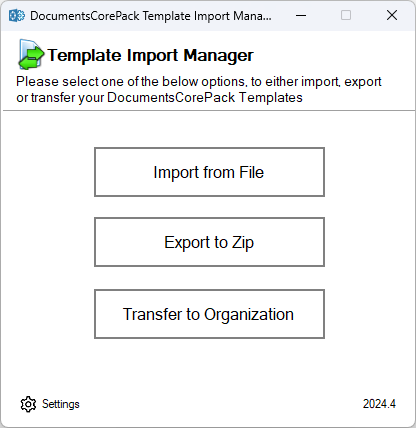
Figure 1: The Template Import Manager options

2. Migrate your data (Dynamics 365 & mscrm-addons.com asset migration) 

Please note: Preserve GUIDs when migrating DCP records like templates and OCAs 

When migrating templates, OCAs, and other DCP assets, it is important to make sure that their GUIDs are preserved. If using our two recommended migration tools below for templates and OCAs, this is guaranteed. But if using your own data migration tool, please ensure the GUIDs are preserved. 

  • Templates: Our DCP Template Manager allows users to import templates to online with the proper GUIDs from the export file.  
  • OCAs: For OCA’s, follow this article that outlines how to use Microsoft’s Configuration Migration tool and the Data Transporter for XrmToolBox.  

3. Stop the local DCP service and setup a DCP online service 

Once data migration has been completed, the local DCP service must be stopped. After it has been stopped, you can then set up a DCP online service. After the online service is set up, you can then import the templates and OCAs via the aforementioned options. 

To set up the online service, follow the steps outlined in this video. To understand how to navigate the online service configuration and view all details of your online service, please view this article. 

Please Note: For licensing questions or to get your online service licensed, please contact sales@mscrm-addons.com. 

Troubleshooting:

  • Please Note (for customers using the Automerge plugins): If you are currently using workflows with DCP, you would need to ensure that you use the AutoMergeWorkingItem steps. The plugin-based workflow steps do not work in online environments. Therefore, you need to either use the AutoMergeWorkingItem steps outlined in this article OR build flows by using our DCP Connector, as outlined in this article. 

That’s it! We appreciate your feedback! Please share your thoughts by sending an email to support@mscrm-addons.com.  

Was this helpful?

1 Yes  No
Related Articles
  • Security issues when installing DocumentsCorePack (Defender)
  • Locating Raw Inputs and Outputs in Power Automate
  • Step by Step: How to execute an OCA in a Power Automate flow 
  • Stop Losing Time & Money: How Manual Document Processes Hurt Your Business
  • Debugging the Template Design Office Add-In 
  • Updating Legacy SharePoint Connections 
Latest Articles
  • The Hidden Inefficiencies Inside Dynamics 365 and How Smart Teams Are Solving Them
  • mscrm-addons.com: 2025 Year in Review
  • Security issues when installing DocumentsCorePack (Defender)
  • AttachmentExtractor: Bandwidth & Performance – FAQ 
  • Recap: Power Platform Community Conference 2025
Popular Articles
  • DocumentsCorePack Template Designer – Getting Started
  • Step-by-Step: How to configure a One-Click-Action
  • Application Access for Dynamics 365
  • How licenses are counted
  • How to find your environment’s unique name in Microsoft Dynamics 365
Top Rated Articles
  • “Undefined”-labels in Chrome and Edge 114 and higher
  • How to insert Condition Fields in DocumentsCorePack Templates designer
  • Important information for Dynamics 365 online customers using DocumentsCorePack and/or AttachmentExtractor
  • How to activate the DocumentsCorePack Connector for PowerApps & Microsoft Flow
  • How licenses are counted
Categories
  • *News and General Infos* 70
  • Webinars 47
  • Template Designer(DCP 197
  • DocumentsCorePack(DCP 264
  • TelephoneIntegration (TI 65
  • AttachmentExtractor (AE 76
  • PowerSearch (PS 50
  • ActivityTools (AT 61
  • SmartBar (SB 54
  • GroupCalendar (GC 47
Our Vision

“We see it as our purpose to provide products that simplify and speed up our customers’ Microsoft Dynamics 365 experience.”

Knowledgebase
LogIn
mscrm-addons.com
  • Products
  • Online Shop
  • Downloads
  • My Account
About Us
  • About Us
  • Case Studies
  • Newsletter
  • Partner Program
  • Contact
Support
  • Support
  • Terms & Conditions
  • Documentation
  • Webinars
  • Legal Documents
  • Impressum
  • © 2025 www.mscrm-addons.com. All Rights Reserved.