Sometimes our support team may ask you to locate specific information that is relevant to your license, such as your tenant ID. This article will help you locate this information.
Locating your Tenant ID
The tenant ID is a unique value tied to your environment. It can be found in your environment’s URL as shown below.

This value can also be found in the Dynamics 365 Business Central Admin Center.
The Business Central Admin Center
The Admin Center can be found under your environment’s Settings.
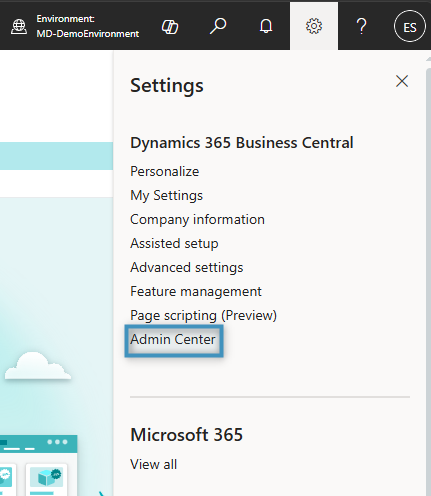
Navigating to the Admin Center will bring you to a list of your environments.
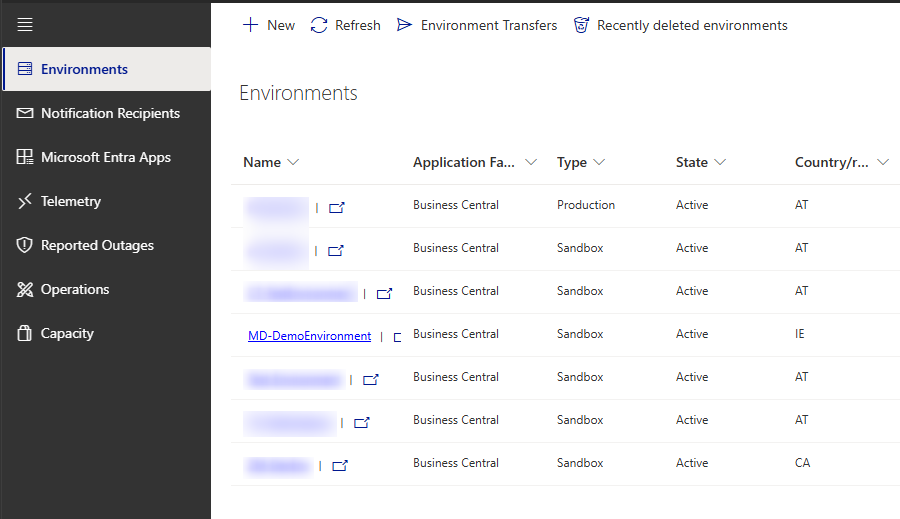
Selecting any of the listed environments will redirect you to the environment’s details. Here, you will find not only the environment’s URL, but other information as well, such as the environment’s name, type, and country.
